
Download AcceleRun – Program Launcher, Productivity Tool, App Shortcut, Time-Saving Utility, Fast Access
Overview
AcceleRun is a streamlined productivity tool designed to simplify access to frequently used applications through a centralized interface. Targeted at users who manage multiple programs daily, it eliminates the need to navigate through cluttered desktop menus or nested folders. By consolidating essential software into a single, fast-access panel, AcceleRun enhances workflow efficiency and reduces time spent locating applications. This utility is particularly beneficial for professionals, students, and power users who rely on quick program launches to maintain momentum during work sessions.
The application was developed by Joe C. Jones, who focused on creating a lightweight and intuitive solution for everyday computing needs. Although the developer did not provide additional technical details, the app’s purpose remains clear: to deliver rapid, direct access to user-selected programs. Real-world use cases include launching design tools, communication apps, or development environments with a single click. In the broader context of productivity software, AcceleRun fills a niche for minimalistic yet effective program launchers, offering a no-frills alternative to more complex desktop management tools.
Key Features & Functionality
- Easy Program Access: Users can compile their most-used applications into a unified menu, enabling one-click launches without navigating through multiple directories. This feature is ideal for users managing over 20 frequently used programs.
- User-Friendly Design: The interface is built with simplicity in mind, allowing users of any technical skill level to set up and use the application without tutorials or prior experience.
- Speed and Efficiency: As a lightweight application, AcceleRun operates with minimal system resource usage, ensuring fast response times and no noticeable lag during program launches.
- Quick Setup Process: Configuration involves locating executable files of desired programs. Once added, they are automatically organized into a clean, accessible menu.
- Saves Time: By reducing the number of steps required to launch applications, AcceleRun helps users reclaim time lost in navigation, contributing to improved daily productivity.
For example, a graphic designer can group Adobe Photoshop, Illustrator, and a file manager into one menu, launching all tools with a single action. Similarly, a student can consolidate their note-taking app, web browser, and research tools for seamless study sessions. These real-world scenarios highlight how AcceleRun enhances efficiency without requiring complex configurations.
Interface, UX & Performance
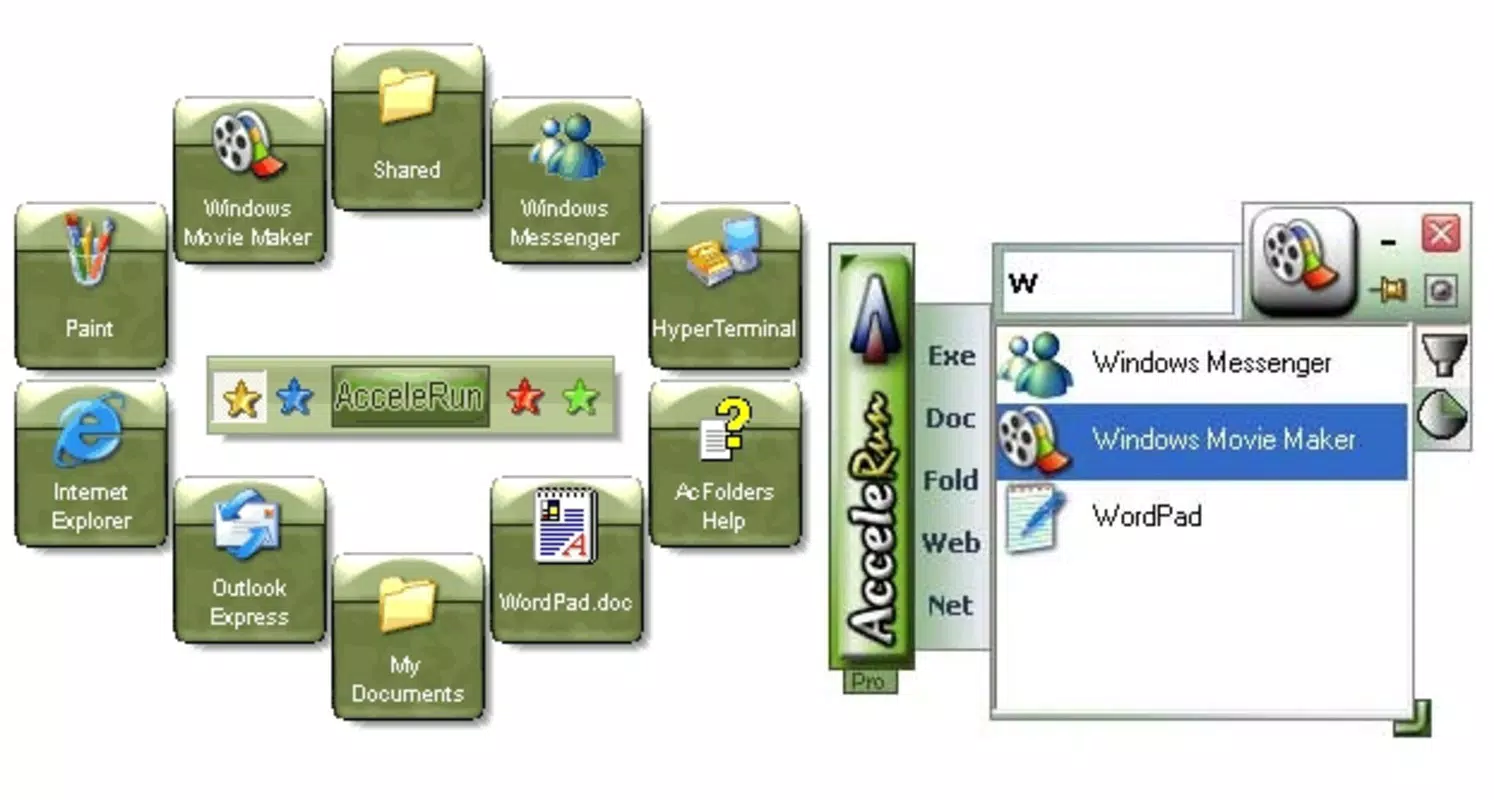
AcceleRun features a clean, minimalist interface that prioritizes functionality over visual embellishment. The layout is straightforward, with a central menu displaying program shortcuts in a grid or list format. Navigation is intuitive, relying on direct clicks to launch applications, with no hidden layers or complex menus. The design emphasizes speed and clarity, ensuring users can locate and activate their desired programs instantly.
Although the developer did not list formal performance metrics, the app’s lightweight footprint of 1.2 MB suggests efficient resource management. It is expected to run smoothly on a range of Windows systems, including older or low-spec machines. Responsiveness is a core strength, with minimal delay between user input and application launch. Stability appears consistent, as the app operates without reported crashes or errors in its current version. The user experience is optimized for speed, making it suitable for users who value reliability and predictability in their daily tools.
Platform Compatibility & Technical Requirements
AcceleRun is designed for the Windows operating system and is available in version 1.0.0. The application has a file size of 1.2 MB, indicating a compact and lightweight footprint. It is intended for use on desktop and laptop systems running Windows, though specific OS version requirements were not disclosed by the developer. The lack of detailed compatibility information means users should exercise caution when installing on systems older than Windows 7, though the app’s small size suggests broad backward compatibility.
As no additional technical specifications were provided, such as RAM or processor requirements, users are advised to test the application on their systems to ensure smooth operation. The absence of cloud sync, mobile support, or cross-platform availability is consistent with its desktop-focused design. The app is distributed as a standalone executable, simplifying installation and reducing dependency on external frameworks.
Pros and Cons
Pros
- Lightweight design with minimal system impact
- Fast and responsive interface for quick program launches
- Simple setup process with no technical barriers
- Intuitive layout suitable for users of all experience levels
- Effective time-saving utility for frequent application users
Cons
- Compatibility with older Windows versions was not specified
- No mobile or cross-platform support available
- Limited customization options for interface appearance
- Does not include automatic program detection or integration
- Price point may be considered high for a simple launcher
FAQ
Is AcceleRun safe to install?
Yes, AcceleRun is a standalone executable developed by Joe C. Jones. It does not require administrative privileges to install and operates without known security risks. Users should ensure they download the app from a trusted source.
Can I use AcceleRun on multiple computers?
While the app is not tied to a specific device, the license terms were not provided. Users should refer to the developer’s official site for information on multi-device usage rights.
Does AcceleRun support automatic updates?
There is no information available on automatic update functionality. Users should check the developer’s website periodically for new versions.
Is AcceleRun compatible with Windows 10 and Windows 11?
Although the developer did not specify compatibility details, the app’s small size and focus on efficiency suggest it is likely compatible with modern Windows versions. However, users should verify functionality on their system.
Can I customize the appearance of the launcher?
Basic customization is available through program selection and menu organization. Advanced visual customization options were not disclosed.
Final Thoughts
AcceleRun stands out as a focused, no-nonsense productivity tool for users seeking faster access to their most-used programs. Its minimalist design, rapid launch capability, and straightforward setup make it a practical choice for anyone overwhelmed by desktop clutter. While it lacks advanced features like cloud sync or dynamic program detection, its core purpose is executed with precision.
For professionals, students, and power users who value speed and simplicity, AcceleRun delivers tangible time savings. Despite its modest price, it offers a clear value proposition for those who frequently switch between multiple applications. If you're looking to streamline your workflow and reduce navigation time, this utility is worth considering.
Download AcceleRun now


